

Among Us 3D Moderation
Greetings, Crewmates.
Thank you for stopping by and for your interest in learning more about our moderation efforts within Among Us 3D and Among Us 3D: VR.
The following question-answers are meant to serve as an in-depth and educational resource for everything “moderation.” Don’t be intimidated by the long list of questions. This is a big and important topic, so we’re just trying to be thorough here.
- What is Voice Moderation?
- What is ToxMod?
- What alerts the system?
- How does ToxMod work?
- Is my voice data being sold for training models or other nefarious purposes?
- How long does ToxMod keep recordings?
- What are the consequences?
- How will I know if I break the rules?
- What does it mean if my “Account has been suspended”?
- What does it mean if I’m “banned”?
- How do I appeal a ban?
- Is Voice Moderation active in Private Lobbies?
- Help! The game won’t let me join my friend’s private lobby?
- Can I opt out of Voice Moderation?
- How do I create a Private Lobby with Voice Moderation turned OFF?
- What is the “Audio Recording Consent”? How do I accept it?
- How do I give Among Us 3D permission to use my device’s microphone?
- What tools are available for Moderation as a player?
- How do I report another player?
- I reported someone and they didn’t immediately get banned.
- Can I report another player who I played with in a Private Lobby with no Voice Moderation?
- I only play in Private Lobbies, but still received a consequence. How?
- I’m a Child. Can I play this game?
- I’m a Parent/Guardian. How do I help my child play this game?
- What’s a KWS account? Should I sign up for this?
- I submitted a request to verify a youth account but I haven’t received an email to complete the process.
- I entered an incorrect birthday and now I’m being told I need to sign up for Kids Web Services. I don’t want this.
- I entered the wrong email address and I’m trying to resubmit a new email address to sign up for a KWS account.
- I completed the KWS account registration, but my permissions aren’t updated in the game.
What is Voice Moderation?
The term “Moderation” is defined as “the action of making something less extreme, intense, or violent.” (Thanks, Oxford Dictionary!) And that’s exactly what we’re intending to do with player language and in-game behavior.
Building a strong, welcoming, and safe community within a voice-heavy, social deduction game has always been a top priority of our team. No one wants a community filled with toxicity, trolls, and mean beans.
Moderation tools for players have been included in Among Us 3D from the very beginning with player-driven tools available to mute and kick other players in lobbies.
In April of 2023, we expanded our moderation efforts in our Among Us VR Patch 5 Update by implementing the ToxMod tool by Modulate after a month of testing it through an opt-in beta.
Recently, in October 2025, we refined our consequence system and implemented account muting for early infringements instead of temporary bans.
Our latest Voice Moderation update on November 13, 2025, expands these overall efforts even further. We’re improving our in-game communications about moderation actions, implementing additional in-game descriptions and information regarding moderation, and allowing players to take moderation efforts within private lobbies into their own hands if they choose.
Our goal has and will continue to be ensuring the safety and security of all players, while meeting your expectations for fun, comfort, and agency.
What is ToxMod?
ToxMod is an automated voice moderation tool that alerts our human support team if voice conversations in lobbies become toxic or harmful.
Created by Modulate, the ToxMod tool has been implemented in a large library of games (including Call of Duty, Rec Room, Grand Theft Auto Online) to ensure player safety and battle toxicity.
You can learn more about Modulate and the ToxMod tool specifically on their official website.
What alerts the system?
We know that jump scares, accusations, and murderous language are all integral parts of being a Crewmate or Impostor. Being a game all about killing each other in space, we know it’s easy to get caught in the moment of deception, alarm, and sabotage. That’s not what we’re concerned about.
Our voice moderation tools will listen for toxic, abusive, or otherwise harmful language that goes against our Code of Conduct.
Here’s what we ARE listening for:
- Slurs
- Hate Speech
- Sexual Harassment
- Predatory Grooming
- Sexually Explicit Language
Here’s what we’re NOT listening for:
- Curse Words
- Playful Banter
- In-Game Violence (“I’m going to kill you!”)
How does ToxMod work?
Built on advanced machine learning technology and designed with player safety and privacy in mind, ToxMod triages voice chat to flag misconduct, analyzes the nuances of each conversation to determine toxicity, and enables our team to quickly respond to each incident by supplying relevant and accurate context.
The ToxMod system is designed to screen for a variety of factors beyond just words used, such as tone, timbre, emotion, and context of a conversation. It will only escalate comments that are truly toxic.
You can learn more about Modulate and the ToxMod tool specifically on their official website.
Is my voice data being sold for training models or other nefarious purposes?
No. We are not selling your data or your voice.
You can read more about Modulate’s Privacy Policy, Privacy and Data Management policies and Ethics Policies regarding AI technology on their official website.
How long does ToxMod keep recordings?
All data gathered by ToxMod is permanently and securely deleted after 35 days.
You can read more about Modulate’s Privacy and Data Management policies on their official website.
What are the consequences?
We take infringements of the code of conduct seriously. Especially considering what we are actually listening for to alert our systems. However, we do also believe in second chances.
Players will be issued warnings, paired with a temporary account mute, upon their first infringements. This allows players to continue playing the game, simply without the ability to use voice chat features for a set duration.
Should a player decide to continue to violate the game’s Code of Conduct after the initial warnings, the account mute punishment will advance to temporary bans. This will lock players out of all lobbies for a set duration.
Finally, while rare, if a player’s problematic conduct continues even after this, the player’s account may be issued a permanent ban.
Note: The activation of a permanent ban is always, 100% of the time reviewed and determined by our human Player Support team.
How will I know if I break the rules?
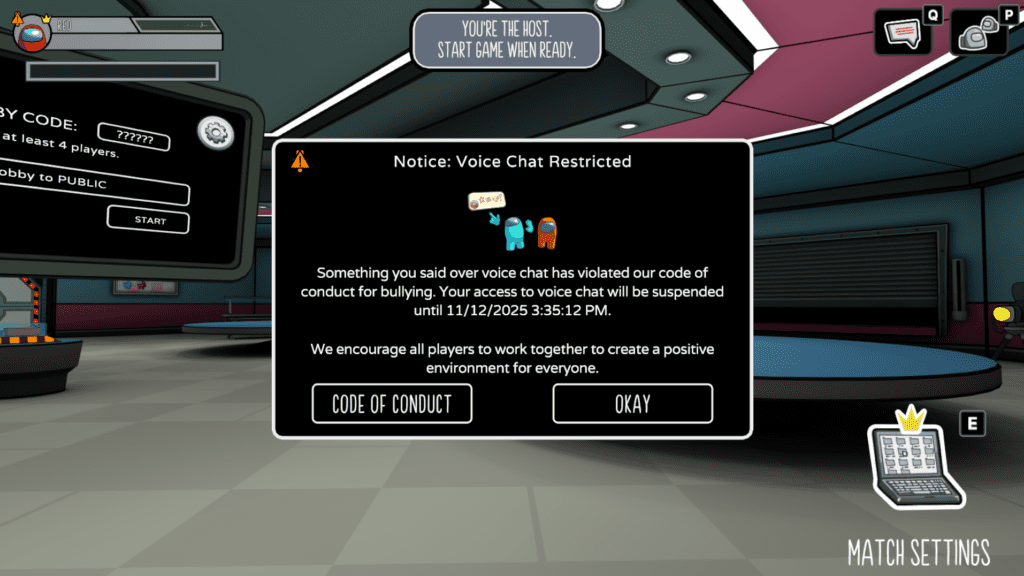
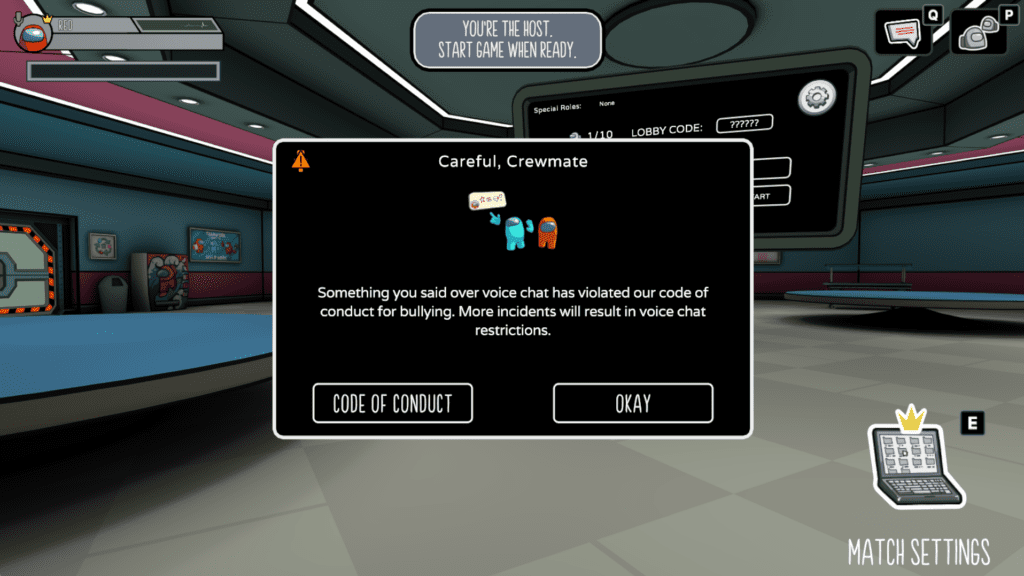
Players will be notified that something they said has triggered the system. This will come as a pop-up message during gameplay and provide a bit more context on what was said and when.
The message will also provide details on any disciplinary actions being implemented, such as a temporary account mute and its duration.
What does it mean if my “Account has been suspended”?
Your account will be temporarily suspended should you break the Code of Conduct.
This essentially places your account under a forced mute, meaning you’ll be unable to use Voice Chat features for a specific duration, ranging from several minutes to days.
An orange warning symbol will appear by your character in the upper left corner of the HUD. This replaces the standard red microphone symbol that you might see if your microphone is muted.
This symbol and the end of your account suspension will also be displayed in the Settings menu, under the Audio tab.
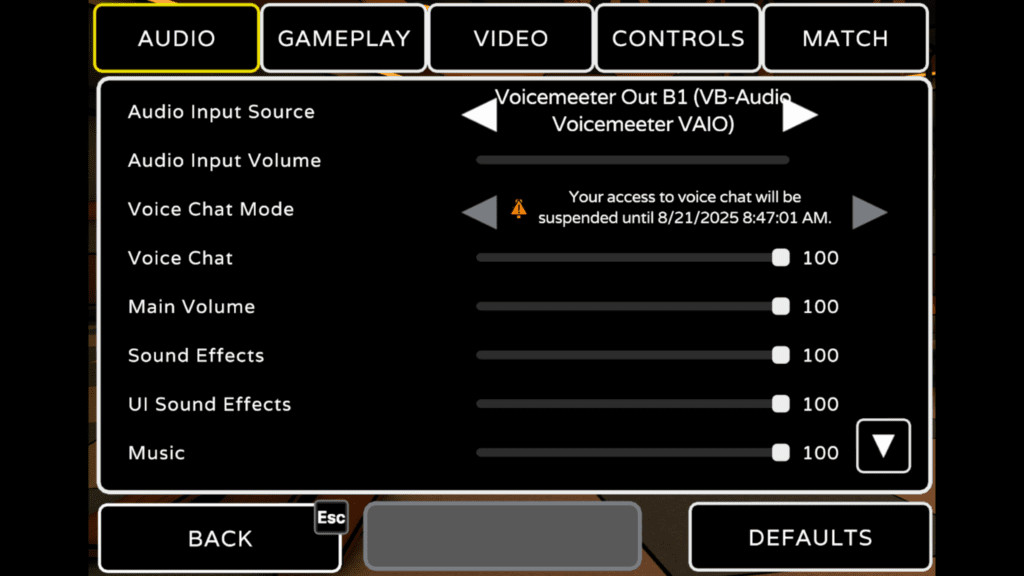
When your suspension ends, your microphone will remain muted until you choose to unmute it on your own. You may notice the orange symbol revert to the red symbol, further indicating that your account suspension has lifted.
Please take these warnings seriously, as continued infringements could result in a permanent ban.
What does it mean if I’m “banned”?
There are two different levels of Ban status: a temporary ban and a permanent ban.
Temporary bans, as implied, are temporary. You’ll be unable to access lobbies for a set duration of time until the ban has expired.
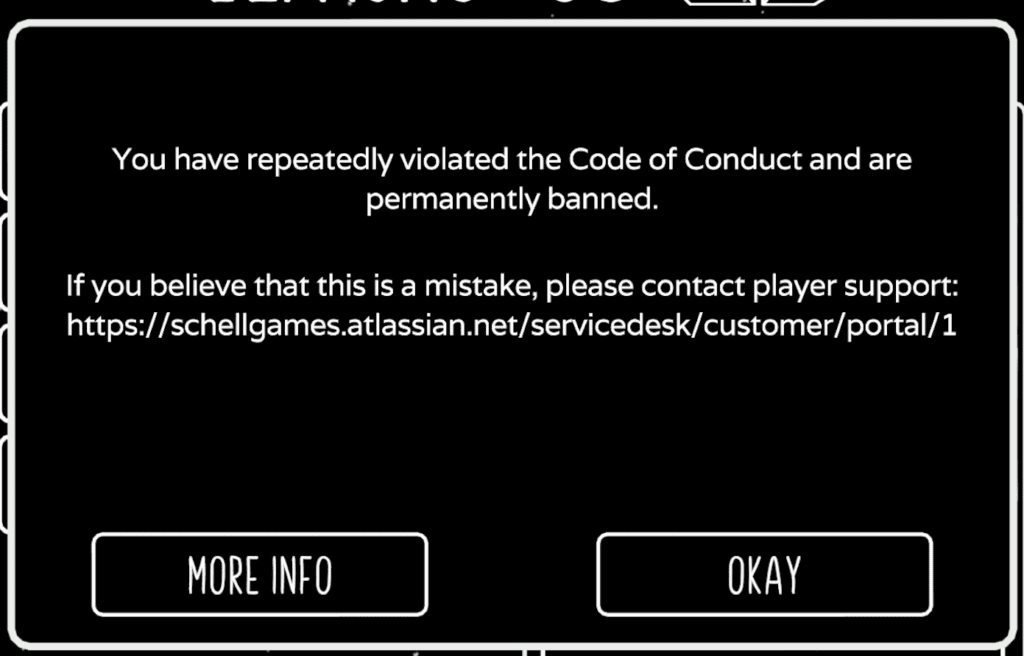
Permanent bans are much more rare. These only occur for the worst-case repeat offenders. In other words, if you’re about to be permanently banned, you WILL know.
It’s also important to note that our ToxMod tool does not implement these bans. Permanent bans require human verification and approval before they are issued.
How do I appeal a ban?
If you think you may have been wrongfully banned, you are able to submit a Ban Appeal. A member of our Player Support team will review your case and get back to you.
You will need to provide the following information to submit your appeal:
- Your contact email address
- The platform on which you were playing the game
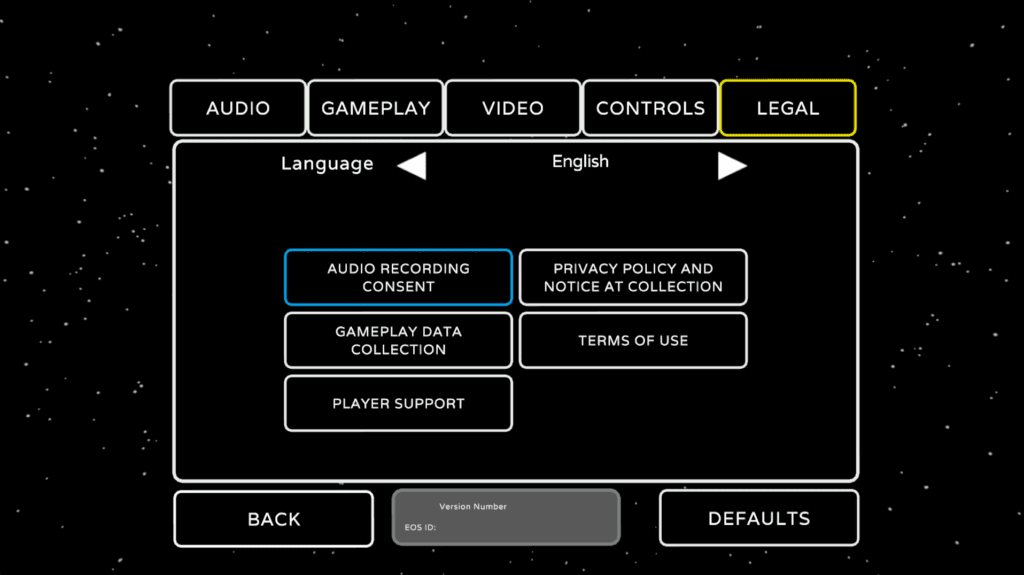
- A screenshot of your Player ID (found in the Settings menu; example below)
- The end date of your Ban
- A brief description of the situation
Please note that we are unable to process appeals for mutes or bans lasting less than three days. If your ban ends in less than three days, you can still submit your ID and we will let you know the nature of the ban. If we find the ban was made in error, the ban will be removed from your user history.
Is Voice Moderation active in Private Lobbies?
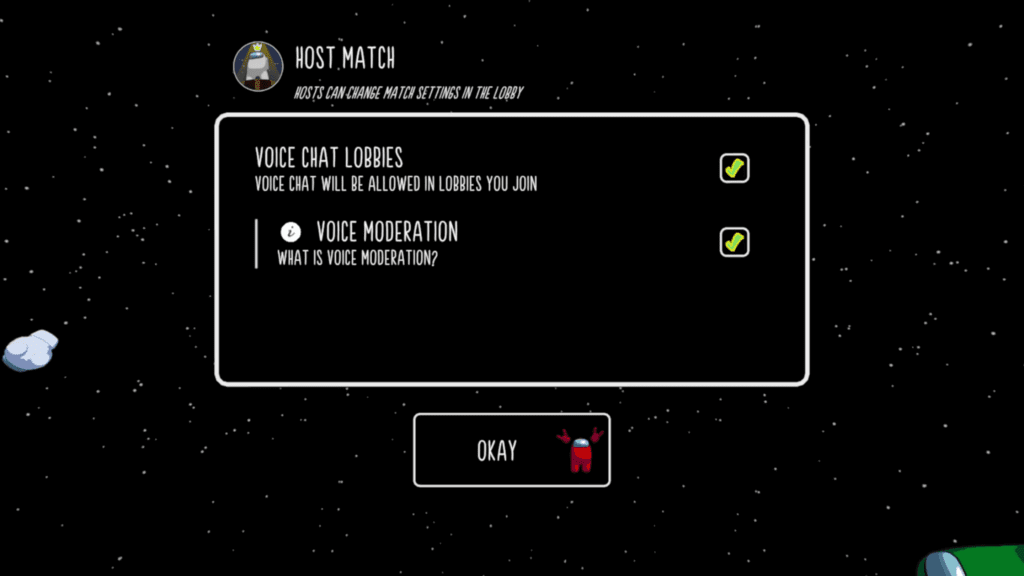
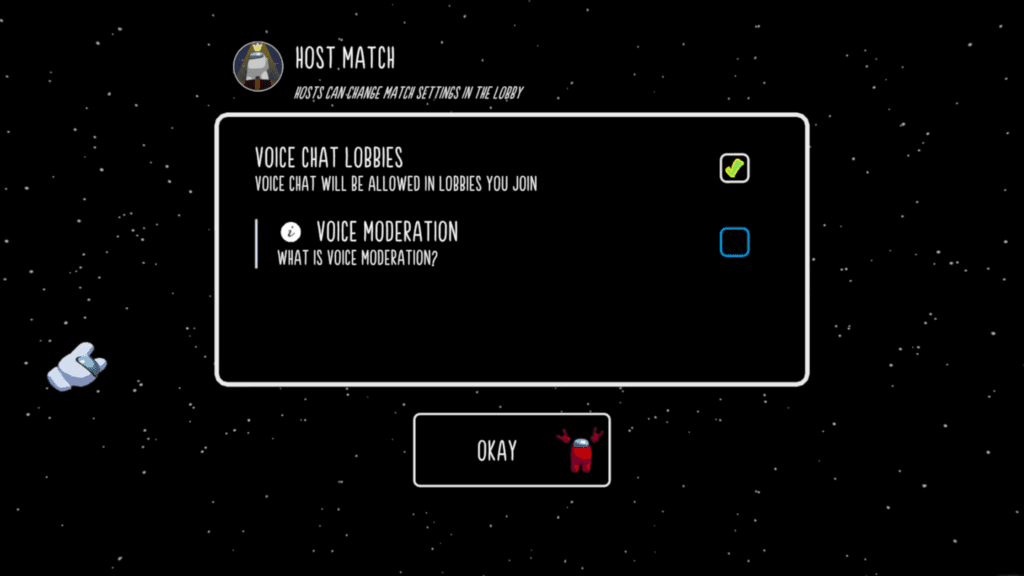
Voice Moderation will be active in lobbies by default, however you can go into Host Match Settings to turn the Voice Moderation OFF by simply unchecking the box.
In some situations, based on your Account Status, the ability to toggle Voice Moderation may be locked. A few example reasons for this include:
- Parent / Guardian settings
- Age-based Restrictions
In this situation, the text and checkmark on this screen will be greyed out and locked.
Pro Tip: Lobbies created with Voice Moderation turned OFF will always have “X” as the first letter of the Lobby Code..
Help! The game won’t let me join my friend’s private lobby?
When trying to join a match through the “Enter Code” option, we still need to take Voice Moderation settings into consideration. This means, you’ll be unable to join a Private Lobby with Voice Moderation OFF if your Account Status requires Voice Moderation to be ON.
Here are a few examples as to why your Account Status would require Voice Moderation:
- You did not accept the Audio Recording Consent.
- You have not granted Among Us 3D permission to use your device’s microphone.
- Your Parent / Guardian settings have denied access to Voice Chat.
Pro Tip: An easy way to distinguish Voice Moderation OFF lobbies is by the lobby code itself! If the first letter of the code is an “X” that means the Private Lobby has Voice Moderation OFF.
Can I opt out of Voice Moderation?
Yes, in most cases.
The simplest way to opt out of Voice Moderation is to either create your own or join a Private Lobby with Voice Moderation turned OFF.
Pro Tip: When joining a Private Lobby, you can tell if Voice Moderation is turned OFF by the first letter of the code: they will always start with an “X”!
Please note: There are a few situations where you will not be able to play in lobbies without Voice Moderation. These include situations where:
- You did not accept the Audio Recording Consent.
- You have not granted Among Us 3D permission to use your device’s microphone.
- Your Parent / Guardian settings have denied access to Voice Chat.
How do I create a Private Lobby with Voice Moderation turned OFF?
From the main menu, select “Play” and choose to “Host Match.”
In the top right corner, select the “Settings” button to open up your “Host Match Settings” options.
Uncheck the “Voice Moderation” box to turn Voice Moderation OFF.
Please note: There are a few situations where you will not be able to create lobbies without Voice Moderation. These include situations where:
- You did not accept the Audio Recording Consent.
- You have not granted Among Us 3D permission to use your device’s microphone.
- Your Parent / Guardian settings have denied access to Voice Chat.
What is the “Audio Recording Consent”? How do I accept it?
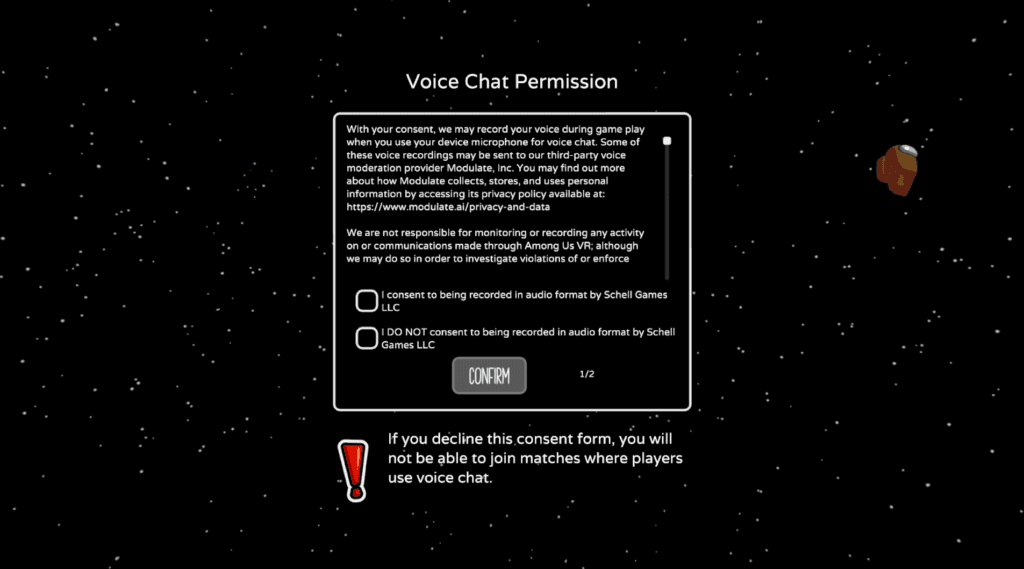
The Audio Recording Consent is your agreement to be recorded while in-game. It essentially grants us the ability to record your voice during gameplay when you are playing in Voice Chat lobbies, which is required for our voice moderation tool, ToxMod.
You’ll be prompted to accept the Audio Recording Consent when you launch Among Us 3D for the first time. However, you may also access this consent form through the Settings menu.
How do I give Among Us 3D permission to use my device’s microphone?
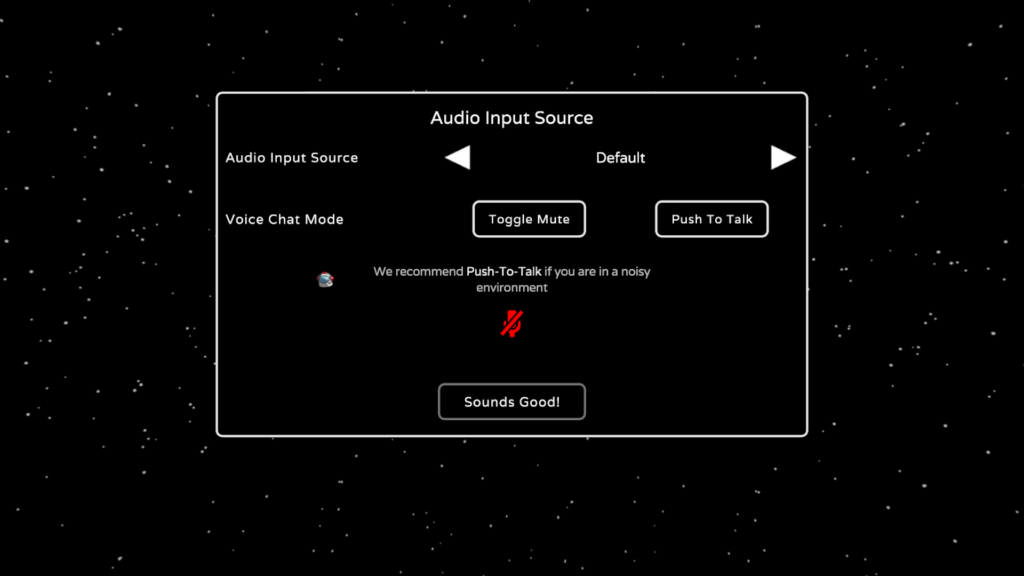
This is done during your first time launching the game. Use the “Audio Input Source” arrows to cycle through available audio inputs to find the correct microphone device you’d like to use.
On PC, you can also adjust your Toggle Mute and Push To talk settings within this window.
What tools are available for Moderation as a player?
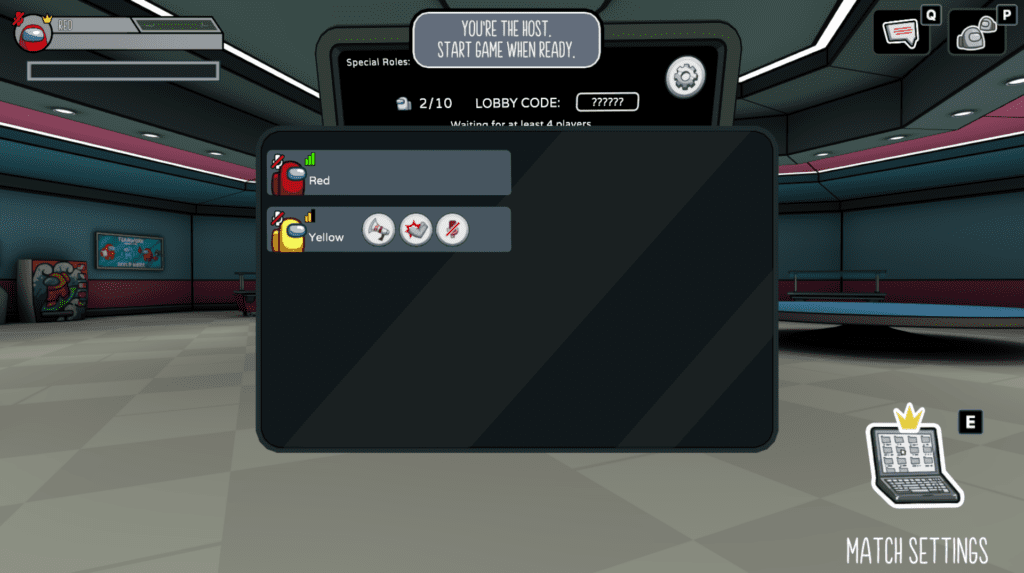
Everyone has access to three Moderation tools at all times within any lobby. These can be found by opening the Players menu and clicking on the user you’d like to take action toward.
- Report Player
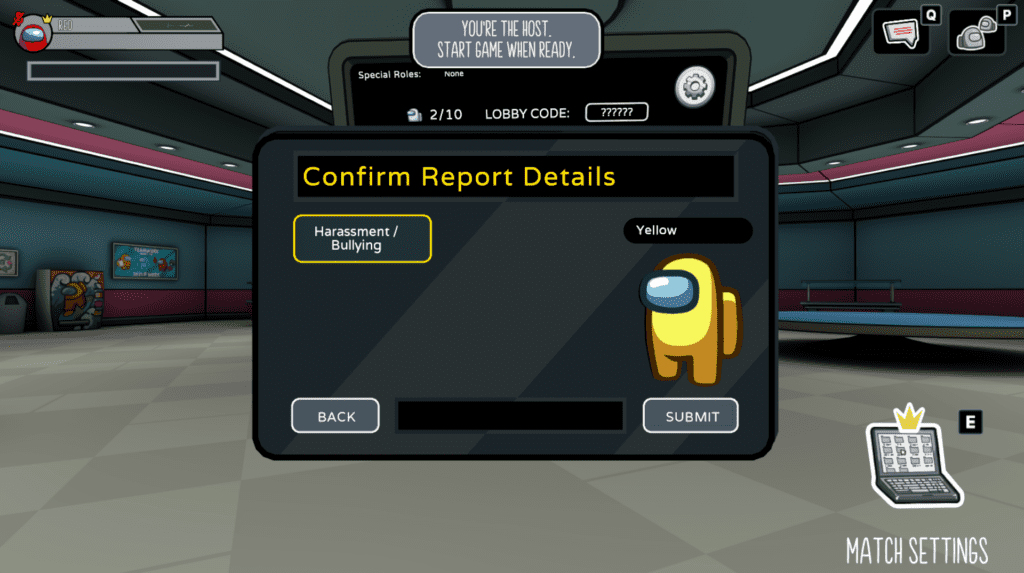
Clicking the ‘Megaphone’ button allows you to report a player and the “Confirm Report Details” window will open.
Their username and current bean color will be reflected on the right side of this screen to make sure you’re reporting the correct player.
Choose the option that best fits the reasons why you’re reporting the player, and then press the “Submit” button on the bottom right. This will send the report to our team for review.
- Kick Player
Clicking the “Foot” button allows you to vote to kick a specific player from the current lobby. When you click the icon, it will change to show that you’ve placed your vote to remove them from the room.
In order for a player to be removed, three players need to vote to kick them. - Mute Player
Clicking the “Microphone” button allows you to mute someone else’s audio input.
This doesn’t change their volume for anyone else in the lobby, just you — so you don’t have to hear them anymore.
Additionally, other players do not know if you Mute another player. Unless you tell them.
How do I report another player?
You can report players using the in-game Moderation tools or through our Player Support channel.
For a number of reasons, including the privacy of other players, our policy is to not update the player who has filed the report with any information about the outcome of their report. We appreciate when players take the time to let us know about an issue, and the moderation team takes every report seriously.
We recommend using the in-game reporting features to report another player, as reports submitted this way contain additional information on the back end, which allows our team to look into any incidents most effectively. We are, unfortunately, unable to act on reports filed using another player’s display name, as display names can be changed easily.
Additionally, you can use platform-specific reporting methods to report players. For more information, please use the following links:
I reported someone and they didn’t immediately get banned.
Patience, bean. We appreciate when players take the time to let us know about an issue, and the moderation team takes every report seriously. Once you’ve sent over your report, we’ll need some time for our team to review. This can take time and certainly won’t be immediate.
For more immediate action, we encourage you to use the Moderation tools available to you in-game to Mute or Kick the offending player after you’ve submitted your report.
Additionally, we want to be clear that for a number of reasons, including the privacy of other players, our policy is to not update the player who has filed the report with any information about the outcome of their report. This means, you won’t get any sort of notification if the player you reported received a Mute or a Ban.
Can I report another player who I played with in a Private Lobby with no Voice Moderation?
In Private Lobbies with no Voice Moderation, our voice moderation tools will not be listening for toxic, abusive, or otherwise harmful language. This means you may encounter spaces with more lenient tolerance for this type of communication.
This said, we want our community to respect our guidelines. If you find that another player in your lobby is disturbing the peace and not following these rules, feel free to submit a report on that player using the in-game tools.
I only play in Private Lobbies, but still received a consequence. How?
While some players may opt to create Private Lobbies that do not use Voice Moderation, this does not mean that the Code of Conduct becomes null and void. Toxicity, harassment, and otherwise unwanted behaviors can be reported from within any lobby — private or public — by other players.
If you have only played in Private Lobbies without Voice Moderation but still received some sort of consequence (mute or ban), this would suggest that another player from within the lobby you played in sent in a report against your actions.
I’m a Child. Can I play this game?
Among Us 3D is rated E10+ for Everyone 10+ by the ESRB, for Fantasy Violence, Mild Blood, Users Interact, and In-Game Purchases.
Parental permission is required for young players. Please have a parent or guardian help you get started!
I’m a Parent/Guardian. How do I help my child play this game?
Welcome, Adult! We’re excited that you’re interested in letting your child play our game. We’ve worked closely with Kids Web Services (KWS) to provide a safer environment for our younger players that will allow you, their guardian, to customize and adjust permissions for their Among Us 3D or Among Us 3D: VR experience.
To do this, your child will need to follow the KWS account process.
If you encounter any hiccups or have any questions along the way, we encourage you to reach out to KWS for additional assistance as we have limited tools available to us on our end to help with their processes. However, we’ve included some additional steps below for situations we’ve previously been able to assist.
What’s a KWS account? Should I sign up for this?
KWS is a platform that helps developers create safe and compliant digital experiences for young audiences by facilitating parental consent and verification, especially in compliance with laws like COPPA and GDPR. It allows younger players to enjoy Among Us 3D and Among Us 3D: VR safely and legally.
If you are a player under the age of digital consent in your region, or a parent of a child interested in playing Among Us 3D or Among Us 3D: VR, you must register that player’s account via KWS.
I submitted a request to verify a youth account but I haven’t received an email to complete the process.
Thank you for signing up to keep your account safe! Please be patient, the verification email often takes a couple of hours to be delivered. Be sure to check all email inboxes, including your spam filter to ensure you see it when it arrives.
I entered an incorrect birthday and now I’m being told I need to sign up for Kids Web Services. I don’t want this.
Sorry for any inconvenience, Crewmate. Our systems require that younger players go through the Kids Web Services flow to ensure their account is safely monitored by a parent or guardian.
If you entered an incorrect birthday and are now finding yourself being prompted to sign up for a KWS account, don’t panic. You will have to go through the process of setting up an account, but there is an option in this process to prove you are an adult. If this is the case, just put in your own email address as the parent/guardian address, and follow the prompts. There will be an opportunity to prove you are an adult, and allow yourself to play with your chosen permissions, which once completed, will free you up to play without a KWS account.
Please note, regardless of whether you are setting up a child’s account, or proving that you are an adult and can play without a KWS account, you must go the whole way through the process to be able to play again.
I entered the wrong email address and I’m trying to resubmit a new email address to sign up for a KWS account.
Sorry to hear you are having trouble with the sign-up process for a KWS account. If you entered an incorrect email address and the link was clicked, the process has now been started and must be completed before you will be able to play the game again.
If the link was sent to an address that you do not have access to, please submit a support ticket with our Player Support team, including as many details as possible (for example, was it sent to an erroneously typed email address, or sent to a person you know but not the parent or guardian you intended?) and we can work with you to explore options for working through the issue.
I completed the KWS account registration, but my permissions aren’t updated in the game.
Once you complete the entire registration process, you need to fully exit the game and then come back in to update the permissions. Please try quitting the game and, if you’re playing the VR version of the game, fully powering down the headset. Please also try a full restart if you have not already done so.
Also please note that the permissions will not be updated if any part of the KWS registration is not complete. We encourage you to double check that everything in the registration process has been completed.
If you’ve made it to the end of this page, you’re a real one. Thank you for your dedication and interest in this endeavor to keep our beans safe!
We know that there isn’t a perfect system and Impostors will find ways to vent through the ship and into our community… but we’re doing our best to provide a safe, welcoming environment for Crewmates like you while providing you with the tools you may need to help shape your best experience.
Feel we’ve forgotten something or can’t find an answer to your specific question? Let us know by contacting our support team here.
Stay suspicious, beans!